
Focus-Enhanced Web Reading Tool
Overview
Readily Tools delivers a streamlined solution for users seeking a distraction-free reading experience directly within their web browser. Designed to reduce cognitive load during online reading, the software enhances focus by minimizing visual clutter and offering customizable reading aids. Its primary purpose is to help users engage more deeply with webpage content, turning passive browsing into an active, immersive reading session. The tool is especially useful for students, researchers, writers, and professionals who spend significant time consuming digital text.
By removing common distractions such as ads, sidebars, and navigation menus, Readily Tools allows users to concentrate solely on the core content. The software supports real-time adjustments, enabling users to fine-tune their reading environment based on personal preferences. Whether working on academic papers, reviewing reports, or simply reading news articles, the tool aims to make the process more efficient and less mentally taxing.
The developer, Readily Tools, has positioned this application as a productivity-focused utility built specifically for modern web consumption habits. While specific details about the company’s background are not available, the software’s design reflects a clear commitment to usability and user-centric features. Real-world applications include long-form article reading, research documentation review, and content summarization tasks where sustained attention is critical.
Key Features & Capabilities
- Distractor-Free Reading Mode – Activates a clean interface that hides non-essential webpage elements, allowing users to focus on the main text content.
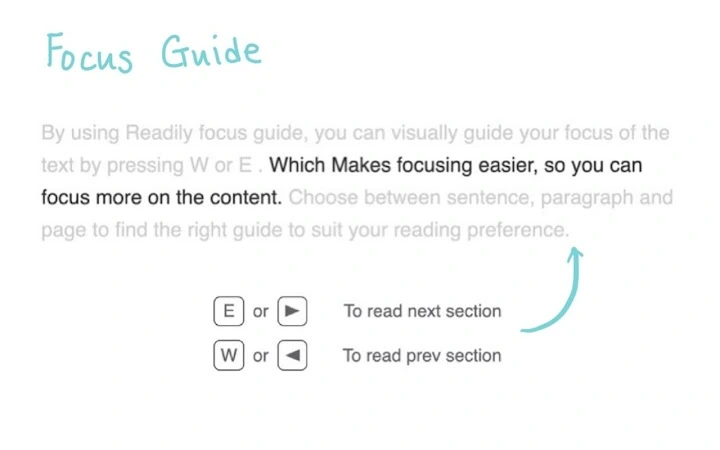
- Sentence Focus Highlighting – Enables users to highlight one sentence at a time, improving comprehension and reducing eye strain during extended reading sessions.
- Customizable Font & Color Settings – Offers options to adjust font type, size, and background color to suit individual visual preferences and reading comfort.
- Dyslexia-Friendly Ruler Feature – Includes a movable ruler that helps guide the eye across lines of text, aiding users with reading difficulties.
- Hotkey Controls – Provides keyboard shortcuts for quick toggling of features: Q+R to activate/deactivate, R to show/hide the menu, H for a cheat sheet, and A, W, E, F, D for specific function control.
- Interactive Ruler Functionality – Clicking the ruler allows users to fix or follow the focus line, enhancing control over reading flow.
These features work together to create a personalized reading environment. For example, a student reviewing a research paper can use sentence focus to digest complex paragraphs one at a time, while a writer might use the dyslexia ruler to maintain rhythm and clarity during editing. The hotkey system ensures minimal disruption to workflow, allowing users to maintain momentum without switching between mouse and keyboard.
User Interface, Workflow & Performance
The user interface of Readily Tools is designed with simplicity and minimalism in mind. It integrates directly into the browser, presenting a clean overlay that does not interfere with the underlying webpage. Navigation is intuitive, relying primarily on keyboard shortcuts, which reduces the need for mouse interaction and supports faster access to core functions.
Workflow efficiency is enhanced by the tool’s lightweight nature and responsive design. Users can activate the reading mode with a single hotkey combination, immediately transforming the page into a focused reading environment. The ability to move sentence focus forward and backward with dedicated keys (E and W) supports dynamic reading pacing, ideal for analytical or summarization tasks.
Performance details were not specified by the developer. However, based on the software’s 25 MB size and browser-based architecture, it is expected to operate efficiently across a range of systems. The developer did not provide additional system requirements or resource usage data. Stability during prolonged use is not documented, but the modular design suggests potential resilience to crashes or freezes.
Compatibility & System Requirements
Readily Tools is compatible with Windows, Mac, and Linux operating systems, making it accessible to a broad user base across different computing environments. The software is designed to function as a browser extension, meaning it operates within standard web browsers without requiring dedicated installation files.
The installation size is 25 MB, which is modest for a productivity tool with visual and interactive components. The software version is 1.0.0, indicating a stable initial release. Exact system requirements were not listed, so users should ensure their operating system and browser are up to date to support optimal functionality.
Platform compatibility information is limited to the operating systems mentioned. No specific hardware requirements were provided. Users are advised to test the software on their system to confirm smooth operation, especially if using older or low-spec devices.
Pros and Cons
Pros
- Minimalist interface enhances focus without clutter
- Keyboard-driven controls improve workflow speed
- Supports accessibility features like dyslexia-friendly ruler
- Free to use with no licensing restrictions
- Available on Windows, Mac, and Linux platforms
- Lightweight design with low installation footprint
Cons
- No detailed system requirements provided
- Performance metrics not disclosed
- Limited information on update frequency
- Browser dependency may restrict full desktop integration
- No offline reading capability mentioned
FAQ Section
Is Readily Tools available for all major browsers?
The software is designed to work within standard web browsers, but specific browser compatibility details were not provided. Users should check the official website for supported browsers.
Is the software safe to install and use?
Readily Tools is a browser-based tool that operates under standard browser security policies. No additional permissions beyond typical extension access are known. Users are advised to download only from the official website to ensure authenticity.
How often are updates released?
Update frequency was not specified. The current version is 1.0.0, and users are encouraged to check the developer’s website for the latest release notes.
What type of license does Readily Tools use?
The software is free to use with no cost or subscription model. No formal license details were disclosed, but the absence of restrictions suggests an open-access model.
Can I use Readily Tools without an internet connection?
As a browser extension, Readily Tools requires an active internet connection to function, since it operates on web content in real time. Offline reading capabilities are not supported based on current information.
Final Thoughts + CTA
Readily Tools stands out as a focused, lightweight utility for anyone seeking to improve their online reading experience. Its emphasis on reducing distractions, combined with smart keyboard controls and accessibility features, makes it a valuable asset for students, researchers, and professionals. While detailed technical specifications are limited, the software delivers a polished, functional experience that aligns with modern productivity needs.
Its cross-platform availability and free access further enhance its appeal. For users who spend significant time reading digital content, this tool offers a practical way to reclaim attention and improve comprehension. The clean design and intuitive workflow ensure a low learning curve, making it accessible even to non-technical users.
With a strong foundation in usability and purpose, Readily Tools is a compelling choice for distraction-free reading. Download Readily Tools now to transform how you engage with web content.







